
Anilab APK – Stream Free Anime on Android, iOS & PC (2026)
AniLab: The best anime streaming app that Provides Premium Anime Movies & TV Series.
If the Anilab App is not working, you can try a temporary alternative named Anilab2.
Meet AniLab: An Anime Library Without Subscription Fees
AniLab APK gives anime fans a free place to stream and download thousands of titles. Its premium content doesn’t require a paid subscription, and the selection caters to different preferences and viewing interests. With a single click, you can start watching or downloading the anime you want.
The library offers something for different moods, from a familiar favorite to a newly discovered story. Once you download AniLab, you gain access to a large collection that receives regular additions, keeping your viewing choices fresh.
Picture quality is another part of the experience. You can enjoy anime in resolutions including 4K, 2K, and 1080p, while subbed and dubbed versions give you more freedom over how you follow the story. Together with buffer-free playback, these options make it easy to enjoy anime your way.
AniLab Specifications at a Glance
| Detail | Information |
|---|---|
| App name | Anilab |
| Version | v1.0.2 |
| File size | 16 MB |
| Price | Free |
| Rating | 4.8+ |
| Downloads | 10 Million+ |
| Category | Entertainment |
| Root required | No |
Features That Make AniLab a Complete Anime Destination
A Full Collection With No Charges
No payment is required to explore the anime collection. AniLab provides unlimited access with no hidden costs, so you can move between movies and series without spending a penny.
Watch With Your Preferred Voices and Subtitles
Choose the viewing format that feels most comfortable. The app includes subtitled anime alongside dubbed versions in different languages, so you can follow each story in your preferred subtitles or audio language.
Smooth Playback From Start to Finish
AniLab offers a seamless, uninterrupted streaming experience without buffering. You can stay focused on the action, dialogue, and story instead of repeated pauses.
New Episodes Added Regularly
The collection keeps growing with frequent content updates. Newly added episodes help you keep up with ongoing series, while regular library additions give you more anime to discover.
Save as Many Episodes as You Want
Downloads make your anime collection available offline. Save unlimited episodes and watch them wherever you are, including places where online streaming isn’t available.
Build and Share Your Own Watch Collection
Keep the titles you care about together in a customizable Favorite List. This helps you save and track your chosen content, and you can share the list with friends who enjoy anime too.
Select the Picture Quality You Enjoy
AniLab includes several resolution options, including 720p, 1080p, 2K, and 4K. Pick the quality you prefer and enjoy detailed visuals across your favorite anime movies and shows.
Enjoy Anime Without Advertising Interruptions
The app offers an ad-free experience with no pop-ups interrupting your viewing. You can move through episodes without promotional interruptions pulling your attention away from the story.
Find Your Way Around With Ease
A modern interface keeps browsing straightforward. Its user-friendly layout helps you switch between sections easily and find the content you want in seconds.
Privacy and Security Built Into the Experience
AniLab is presented as a 100% safe and secure anime app. It is designed to provide content without policy violations, while its security measures protect users’ personal information and privacy.
Start Watching Without Creating an Account
You don’t need to buy a subscription or complete registration to watch. Install the AniLab app and start exploring its shows immediately, with sign-in available as an optional step.
Take Your Anime Beyond One Screen
AniLab supports viewing across multiple device types. Alongside Android smartphones, you can download it for PCs, Firestick, Fire TV, and Smart TVs, giving you a choice between a personal screen and a larger display.
Download AniLab and Set Up Your Device
The download section includes device categories for Android, iOS, PC, TV, Firestick, and Roku. The detailed installation instructions below cover Android smartphones and tablets. The app’s limitations section also notes that an official iOS version has not been released yet.
Install AniLab on an Android Phone or Tablet
Step 1: Turn on installation from unknown sources
Open your device’s Settings and look for the option labeled “Install Unknown Sources.” Find AniLab in the relevant options and enable the setting before continuing.
Step 2: Get the APK from the download section
Select the “Download” button on our website to start saving the APK file. Let the download finish before opening the installer.
Step 3: Complete the installation
Tap the downloaded AniLab APK file, then choose “Install.” Wait for the installation to finish; then the app will be ready to open.
From First Launch to Your Next Favorite Episode
Getting familiar with AniLab only takes a few steps. Here is how to move through the welcome screen, explore the library, and personalize your viewing experience.
Open the Installed App
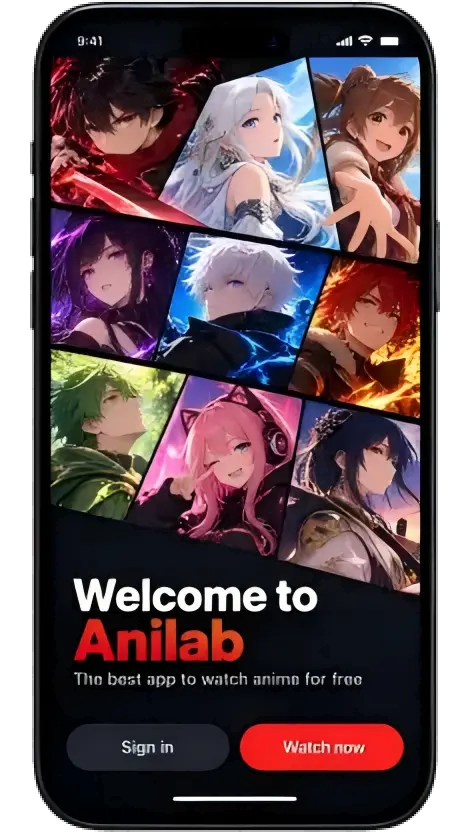
After installing AniLab, launch it from your device. This takes you to the opening screen, where you can choose how to begin.
Choose Between Signing In and Watching Immediately
The welcome screen offers two options: “Sign in” and “Watch Now.” Signing in or creating an account lets you save your watch history. If you would rather begin browsing straight away, choose “Watch Now” to enter the app without registering.
Get Familiar With the Home Screen
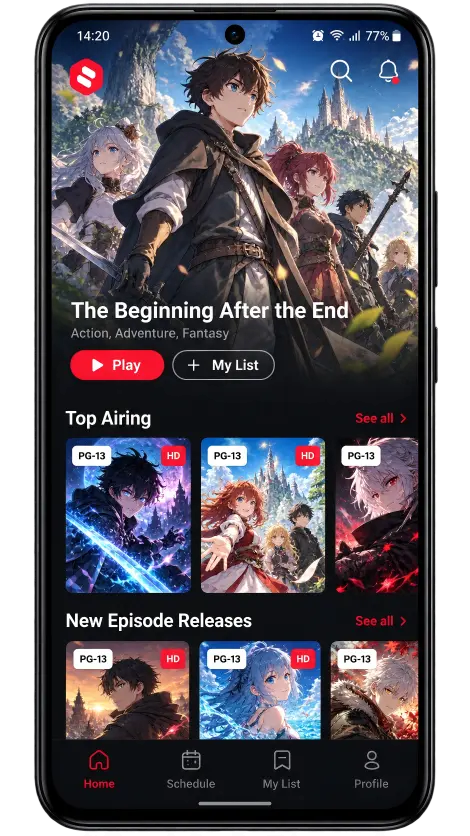
The main interface uses a modern, easy-to-follow layout. At the top, a content slider highlights the latest additions, so you can see what is new as soon as you open the app.
Look Through the Available Collections
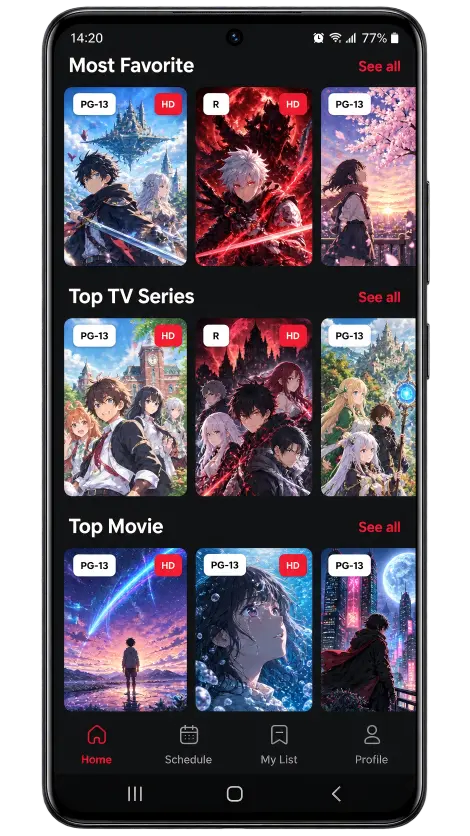
Browse the extensive anime library to discover top movies, television series, popular selections, favorites, and recently released titles. These collections make it easier to find both familiar content and something different to watch.
Search Directly for a Movie or Show
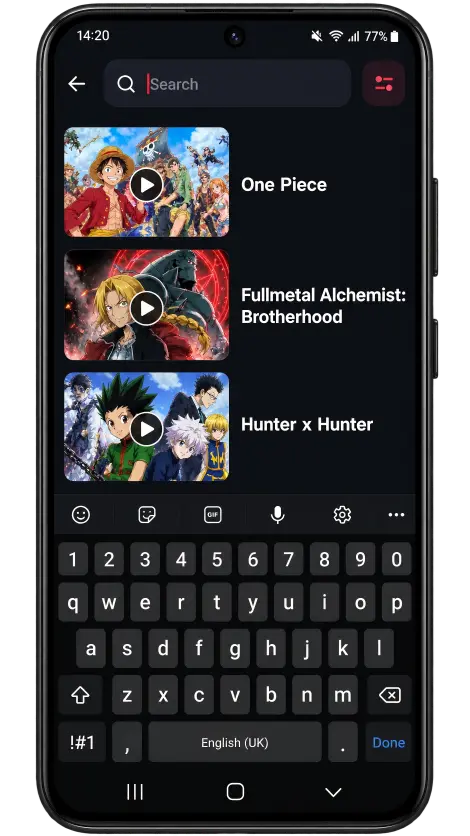
If you already know what you want, select the Search option in the upper-right corner. Enter the movie or series name to find it quickly without browsing every category.
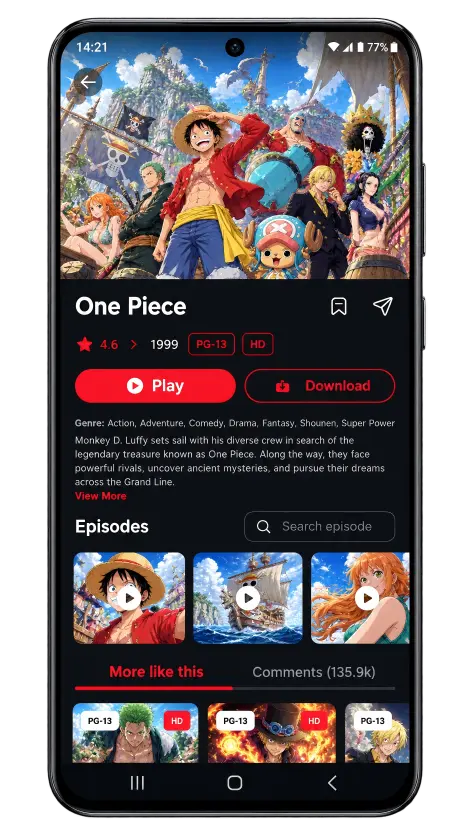
Pick a Title and Start Playback
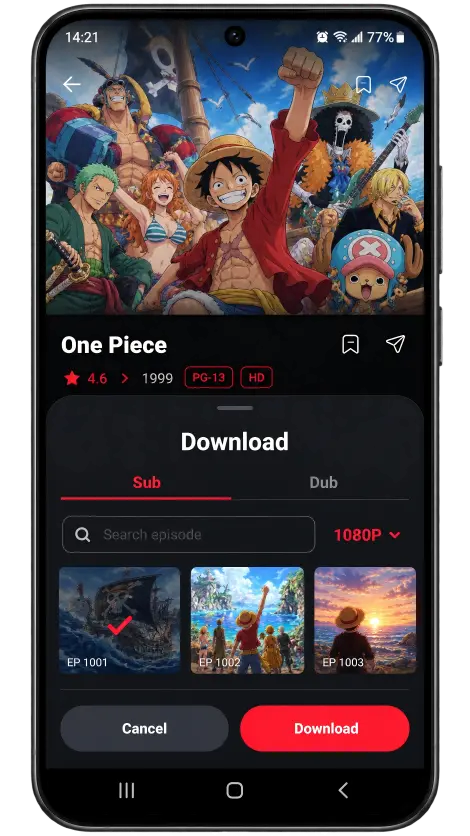
Open the anime you want to watch. For a series, choose the particular episode before pressing “Play.” Select a video player to begin playback, then choose between the subbed and dubbed versions. Subbed content includes subtitles, while dubbed versions offer voice-over in other languages, including English.
Adjust Subtitles and Save Your Favorites
Use the Subtitles icon at the top right to choose your preferred subtitles. Further customization is available through “Subtitle Settings” in your profile.
You can also add a title to your Favorite List so it is easy to find again. To watch without an internet connection, select “Download” to save the anime for later.
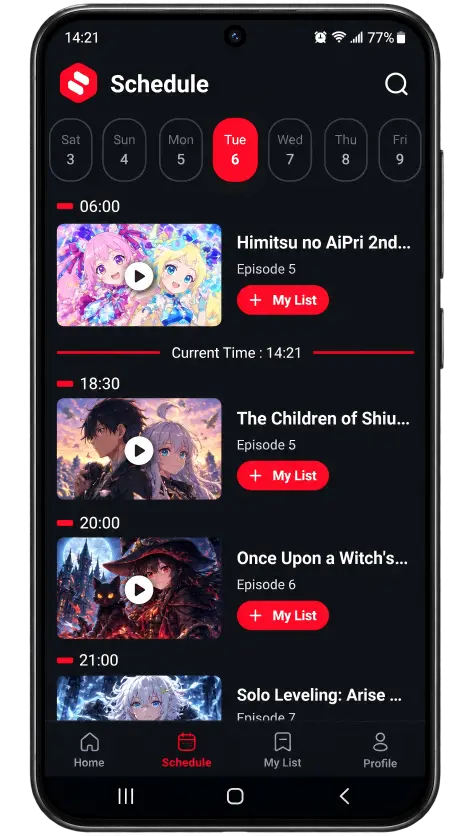
Plan Your Viewing With the Schedule Feature
The Schedule option helps you organize future viewing. Choose the content you want to watch and select a specific date. This feature requires you to sign in, so log into your account before creating your schedule.
AniLab Safety, Privacy, and Legal Claims Explained
AniLab describes itself as the safest and most secure anime option for users across devices. Its stated approach prioritizes privacy, follows user data protection guidelines, and protects both personal information and device security.
The app also states that it provides anime without policy violations. Its privacy explanation links the absence of third-party advertising to its claim that it doesn’t collect user data, presenting the service as a way to enjoy anime without privacy or safety concerns.
Keep AniLab Updated With the Newest Release
Installing updates gives you access to new features, improvements, and fixes. Follow this process to replace the older app with the latest available version.
Remove the Previous Installation
Press and hold the AniLab icon on your device, then choose “Uninstall.” Complete the removal before moving on to the new APK.
Download the Updated APK
Visit our website and select the “Download” button for the latest version. The file will begin downloading; allow it to finish before starting installation.
Run the New Installer
Open the downloaded APK to begin setup. Respond to any permission requests that appear during installation and wait for the process to complete.
Open the Updated App
Launch AniLab after installation. Then explore the latest features, improvements, and available content in the updated experience.
Check Back for Future Updates
As an optional habit, revisit our website regularly for new releases. This helps you keep up with additional features and improvements over time.
Return to an Earlier AniLab Version When Needed
An updated release may not work smoothly on every device. Older operating systems and compatibility limitations can sometimes make a previous version a better fit. If the newest installation causes problems, follow these steps to install an older release.
Uninstall the Version Already on Your Device
Locate the app icon, press and hold it, and choose “Uninstall.” Remove the current installation before installing an earlier APK.
Choose a Release That Matches Your Device
Visit the older-version collection on our website to find previous app releases. Review the options and choose a version compatible with your device.
Save the Earlier APK File
Once you have chosen a suitable release, use its “Download” button to save the older APK. Wait for the download to finish.
Install and Open the Selected Release
Tap the APK file to launch the installation process. Follow the on-screen steps and respond to any requested permissions. When setup is complete, open the app and return to your anime collection.
Discover Anime That Matches Your Mood
AniLab includes a range of genres, making it easier to choose a story that suits your interests or the kind of entertainment you want today.
Fast-Paced Action and Memorable Adventures
For viewers who enjoy excitement, exploration, and an adrenaline rush, the action and adventure collection offers plenty to watch. Browse anime movies and television shows built around energetic stories and thrilling journeys.
Shounen Stories and Extraordinary Abilities
The shounen and superpower selection caters to younger viewers and fans of characters with remarkable abilities. Its range of titles provides plenty of opportunities to explore this energetic side of anime.
Everyday Humor and Romantic Storylines
If you enjoy stories centered on relationships and daily life, explore the romance and comedy categories. Romantic movies and series bring emotional stories to the screen, while humorous titles offer a relaxing break during a busy day.
Imaginative Fantasy and Science Fiction
Step away from your usual routine with epic adventures and stories beyond everyday reality. The fantasy and sci-fi collection offers imaginative anime that can help you unwind and refresh your mind when you have some free time.
Practical Ways to Get More From the AniLab App
AniLab Benefits and Limitations Worth Reviewing
What the App Offers Viewers
- An ad-free, pop-up-free viewing experience.
- High-resolution anime streaming, including 4K, 2K, and 1080p.
- Built-in video players optimized for playback.
- Anime available in multiple languages.
- A broad collection spanning classic favorites and new releases.
- Download support lets you watch offline anytime, anywhere.
- Customer support available 24/7.
- Commenting features that encourage discussion with the anime community.
Points to Keep in Mind
- An official iOS version hasn’t been released yet.
- Some countries may have restrictions affecting available content.
- Uninterrupted streaming requires a high-speed internet connection.
- Saving content requires an external downloader, such as SPlayer.
Five Other Anime Platforms to Explore
If you want more places to discover anime, the following platforms offer different collections and viewing experiences.
Crunchyroll: Subscription-Based Anime on Demand
Crunchyroll is a popular American-based service offering on-demand anime streaming. Its extensive collection covers both movies and series. Access is subscription-based, with a free trial available for viewers who want to try the platform.
AnimeLab: Thousands of Episodes and Familiar Favorites
AnimeLab gives anime enthusiasts free access to a large collection of high-quality titles and episodes. Its selection includes well-known series such as Dragon Ball Super, Naruto, and One Piece, making it an option for fans looking for recognizable favorites.
9anime: Free Subbed and Dubbed Viewing
9anime offers anime in both subtitled and dubbed formats for free. It works with smartphones, supports Chromecast, and provides high-quality playback for different screen types.
AnimoHub: Organized Anime Browsing on Android
AnimoHub focuses on an accessible viewing experience for Android phone users. Its library combines classic favorites with recent anime movies and series, while an organized interface helps users move through the collection easily.
AnimeHub arranges its extensive library alphabetically, with release dates offering another way to locate content. The platform is free to use and provides anime fans with an uninterrupted online streaming experience.
Answers to Common AniLab Questions
What Can I Try if AniLab Is Not Working?
If AniLab becomes unavailable or stops working, you can try Anilab2 as a temporary alternative. A problem on one device does not, by itself, establish whether the entire service is down.
Do I Have to Pay to Watch Anime?
No. AniLab provides free access to its anime collection without subscription charges or hidden viewing costs.
Will Ads or Pop-Ups Interrupt Playback?
The app offers an ad-free experience, so you can watch anime without ads or pop-up interruptions.
How Does AniLab Describe Its Download Safety?
AniLab presents itself as a 100% safe and secure option that protects user privacy, follows data protection guidelines, and safeguards personal information and device security.
Is a Subscription or Account Required?
You don’t need a paid plan or an account to start watching. Choose “Watch Now” to skip registration, or sign in to access features such as saved watch history and scheduling.
When Are More Episodes Added?
The library receives regular updates, including new episodes and additional anime titles. Checking the collection frequently helps you keep up with the latest additions.
Can I Save Anime for Offline Viewing?
Yes. AniLab supports unlimited episode downloads for offline viewing. The download process requires an external downloader, such as SPlayer.
Which Language Options Are Available?
The app includes subbed and dubbed anime in multiple languages, including English dubbing. Choose the available audio and subtitle options that suit your preferences.
Where Can I Change Subtitle Preferences?
Select the Subtitles icon during playback to choose subtitles. For further adjustments, open the “Subtitle Settings” section within your profile.
How Can I Personalize Recommendations and Stay Informed?
Use the sign-in or sign-up option for a more personalized experience, then build your Favorite List around the content you enjoy. An account helps you track favorite titles and upcoming releases. The provided app details don’t mention a separate control for recommendations or notifications.
Bring Your Favorite Anime Into One Place
AniLab combines free anime movies and series with high-definition streaming, multiple language options, and both subbed and dubbed viewing. You can follow stories in your preferred or regional language, use subtitles, and enjoy ad-free playback without pop-ups.
Its premium features extend beyond streaming, with downloads, favorites, subtitle customization, and scheduling giving you more control over your experience. Broad device compatibility also lets you choose between a smartphone and larger screens, including Firestick and Smart TV setups, while an official iOS release remains unavailable.
To get started, follow the download and installation instructions above, open the app, and explore the anime collection for free.